



Esta guía explica el proceso de configuración de la autenticación multifactor (MFA o 2FA) de Protectimus para NetApp Virtual Desktop Service (VDS) mediante el protocolo RADIUS.
Al integrar la autenticación de dos factores de Protectimus con NetApp Virtual Desktop Service mediante RADIUS, Protectimus Cloud 2FA Service o On-Premise 2FA Platform actúa como servidor RADIUS a través de un conector específico denominado Protectimus RADIUS Server. Por su parte, NetApp VDS funciona como cliente RADIUS.
El funcionamiento es el siguiente: el conector Protectimus RADIUS Server reenvía las solicitudes de autenticación de NetApp VDS al servidor de autenticación multifactor (MFA) de Protectimus. En función de la respuesta recibida, se concede o deniega el acceso.
A continuación, ofrecemos un ejemplo de cómo integrar Protectimus 2FA con NetApp Virtual Desktop Service para configurar la MFA de NetApp VDS.
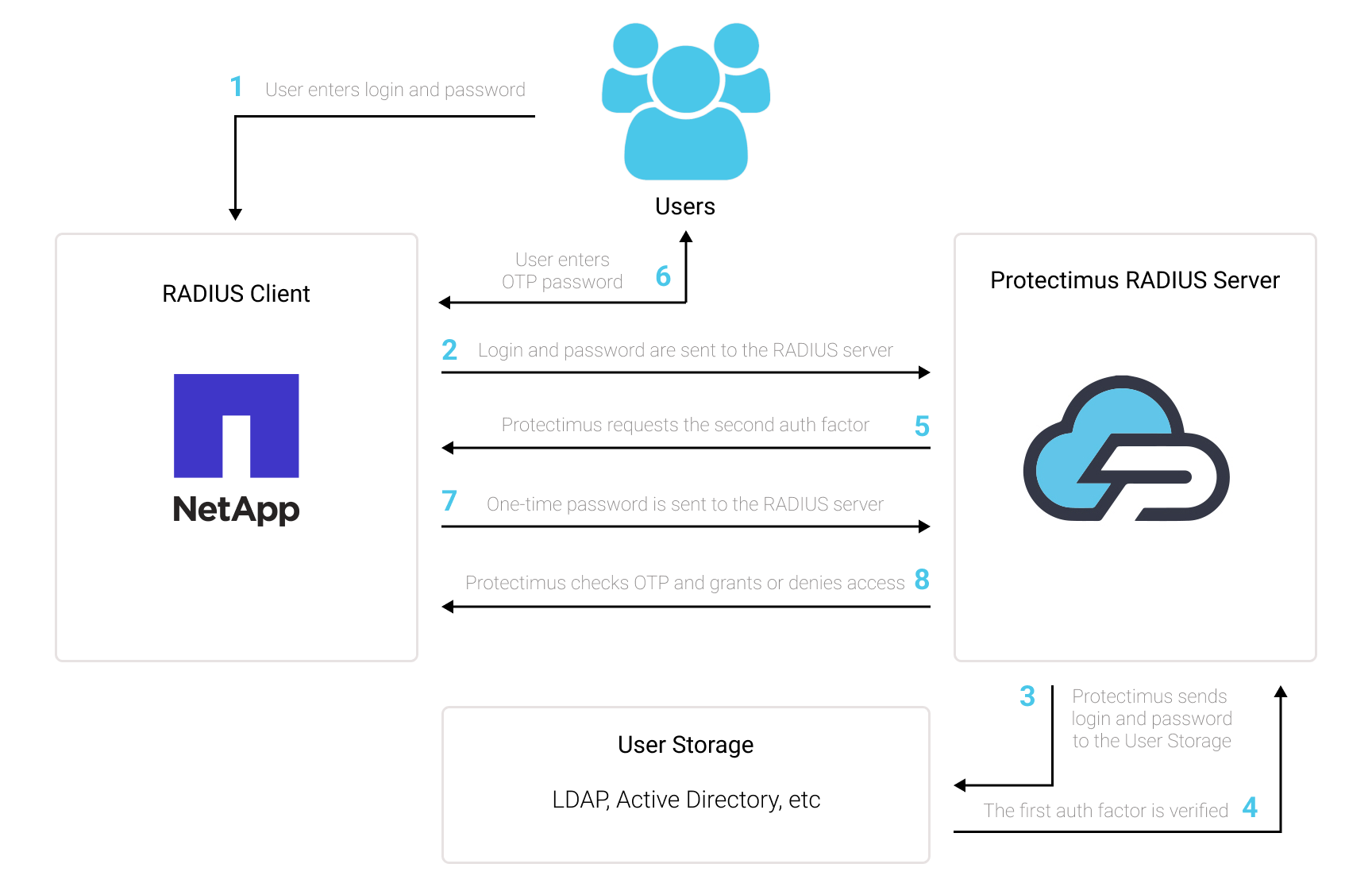
Puede configurar la autenticación multifactor (2FA) para NetApp VDS con Protectimus mediante el protocolo RADIUS:
- Regístrese en Protectimus SAAS Service o instale On-Premise 2FA Platform y configure los ajustes básicos.
- Instale y configure Protectimus RADIUS Server.
- Añada Protectimus como servidor RADIUS para NetApp Virtual Desktop Service.
Elija la opción de despliegue y complete la configuración básica:
Encontrará instrucciones detalladas para instalar y configurar Protectimus RADIUS Server para la autenticación de dos factores de NetApp Virtual Desktop Service mediante RADIUS en nuestra guía de instalación de Protectimus RADIUS Server para la 2FA de NetApp Virtual Desktop Service.
| Label | Introduzca un nombre para el servidor RADIUS. |
| Hostname/Address | Dirección IP del servidor en el que está instalado el componente Protectimus RADIUS Server. |
| Authentication Port | Indique 1812 (o el puerto que haya configurado en el archivo radius.yml de Protectimus al configurar Protectimus RADIUS Server). |
| Authentication type | Se requiere la autenticación PAP. |
| Shared secret code | Indique el secreto compartido que creó en el archivo radius.yml de Protectimus (propiedad radius.secret) al configurar Protectimus RADIUS Server. |
| Server timeout (in seconds) | Establézcalo en 90 segundos. |
| Max attempts | Este valor especifica cuántas veces debe enviarse la solicitud de autenticación. Establézcalo en 1. |
La integración de la autenticación de dos factores (2FA/MFA) para NetApp Virtual Desktop Service ha finalizado.
Si tiene alguna otra pregunta, póngase en contacto con el servicio de atención al cliente de Protectimus.










