Activación de la autenticación de dos factores en Juniper VPN
Esta guía de 2FA para Juniper VPN muestra cómo habilitar la autenticación de dos factores (2FA/MFA) para Juniper Secure Access SSL VPN mediante Protectimus Cloud 2FA Service u On-Premise 2FA Platform.
Protectimus se integra con Juniper Secure Access SSL VPN mediante el protocolo de autenticación RADIUS para añadir la autenticación de dos factores (2FA) a los inicios de sesión en la VPN.
En este escenario, la solución de autenticación de dos factores de Protectimus para la 2FA de Juniper VPN actúa como servidor RADIUS, mientras que Juniper Secure Access SSL VPN desempeña la función de cliente RADIUS. A continuación, encontrará el esquema de funcionamiento de la solución de Protectimus para la autenticación de dos factores de Juniper VPN.
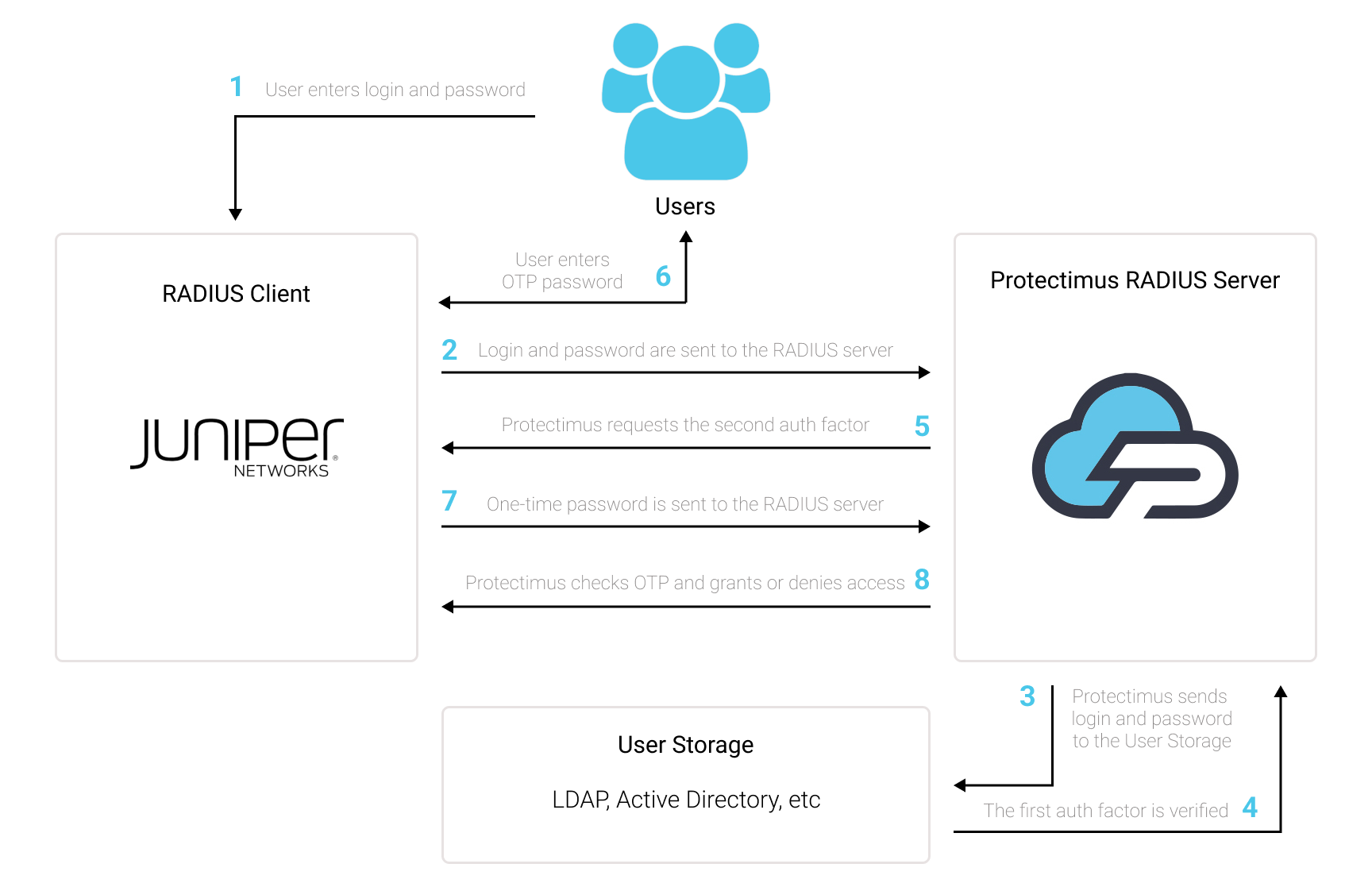
1. Cómo funciona la autenticación de dos factores (2FA) en Juniper VPN
La autenticación de dos factores (2FA), también conocida como autenticación multifactor (MFA), es una medida de seguridad indispensable para Juniper Secure Access SSL VPN. La 2FA protege los inicios de sesión en Juniper VPN frente al phishing, los ataques de fuerza bruta, la falsificación de datos, la ingeniería social, los registradores de teclas, los ataques de intermediario y otras amenazas.
Y así es como funciona la autenticación de dos factores para Juniper Secure Access SSL VPN:
- Cuando un usuario inicia sesión en Juniper VPN protegido mediante autenticación de dos factores, primero introduce el primer factor de autenticación: su nombre de usuario y contraseña habituales (algo que el usuario sabe).
- A continuación, se le solicitará un segundo factor de autenticación: un código de acceso de un solo uso procedente del token de autenticación de dos factores (un token 2FA es algo que el usuario posee; por lo general, un smartphone o un token físico OTP similar a un llavero).
Para acceder a una cuenta de Juniper Secure Access SSL VPN protegida mediante autenticación de dos factores, un atacante debe obtener dos factores de autenticación de distinta naturaleza, una tarea muy difícil. Además, una contraseña de un solo uso basada en el tiempo solo permanece activa durante 30 segundos, lo que dificulta aún más el ataque y lo hace prácticamente imposible.
2. Cómo habilitar la 2FA (autenticación de dos factores) en Juniper VPN
Puede configurar la autenticación de dos factores (2FA) de Juniper VPN con Protectimus mediante el protocolo RADIUS:
- Regístrese en Protectimus SAAS Service o instale On-Premise 2FA Platform y configure los ajustes básicos.
- Instale y configure Protectimus RADIUS Server.
- Configure las políticas de autenticación de Juniper Secure Access SSL VPN.
2.1. Registrarse y configurar los ajustes básicos de Protectimus
Elija su opción de implementación y complete la configuración básica:
Protectimus Cloud Service
- Regístrese en Protectimus Cloud Service y active la API.
- Añadir un recurso.
- Añadir usuarios.
- Añadir tokens manualmente o activar el portal de autoservicio para usuarios.
- Asignar tokens a los usuarios.
- Asignar usuarios y tokens al recurso.
Protectimus On-Premise Platform
- Instalar Protectimus On-Premise Platform. Si instala Protectimus Platform en Windows, seleccione la opción RADIUS durante la instalación.
- Añadir un recurso.
- Añadir usuarios.
- Añadir tokens manualmente o activar el portal de autoservicio para usuarios.
- Asignar tokens a los usuarios.
- Asignar al recurso los tokens junto con los usuarios.
2.2. Instalar y configurar Protectimus RADIUS Server
Encontrará instrucciones detalladas para instalar y configurar Protectimus RADIUS Server para Juniper Secure Access SSL VPN mediante RADIUS en nuestra Guía de instalación de Protectimus RADIUS Server para la 2FA de Juniper VPN.
2.3. Configurar el perfil del servidor RADIUS de Juniper VPN
- Inicie sesión en la interfaz de administración de Juniper.
- En el menú de la izquierda, vaya a Authentication –> Auth Servers.
- Seleccione Radius Server en el menú desplegable y, a continuación, haga clic en New Server.
- En el campo Name, introduzca Protectimus RADIUS.
- En la sección Primary Server, ingrese la siguiente información:
| Radius Server |
Dirección IP del servidor en el que está instalado el componente Protectimus RADIUS Server. |
| Secret |
Indique el secreto compartido que creó en el archivo radius.yml de Protectimus (propiedad radius.secret) al configurar Protectimus RADIUS Server. |
| Authentication Port |
Indique 1812 (o el puerto que haya configurado en el archivo radius.yml de Protectimus al configurar Protectimus RADIUS Server). |
| Timeout |
Establézcalo en 60 segundos. |
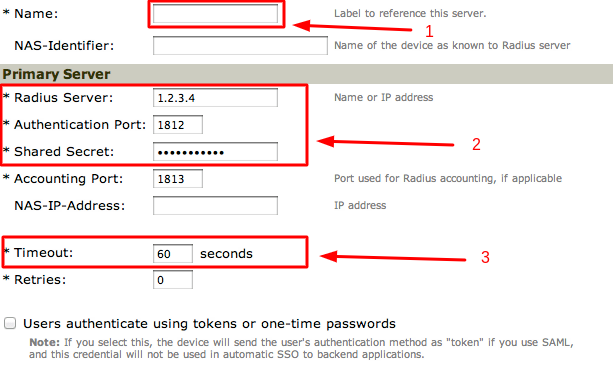
- Haga clic en Save Changes para guardar el perfil del servidor RADIUS.
2.4. Añadir reglas RADIUS personalizadas a Juniper VPN
2.4.1 Crear una regla para el paquete Access Challenge
- Desplácese hasta la sección Custom Radius Rules.
- Haga clic en New Radius Rule.
- En el campo Name, introduzca Protectimus Radius Rule 1.
- Para el Response Packet Type, seleccione Access Challenge.
- En la sección Then take action section, seleccione la página Show Generic Login.
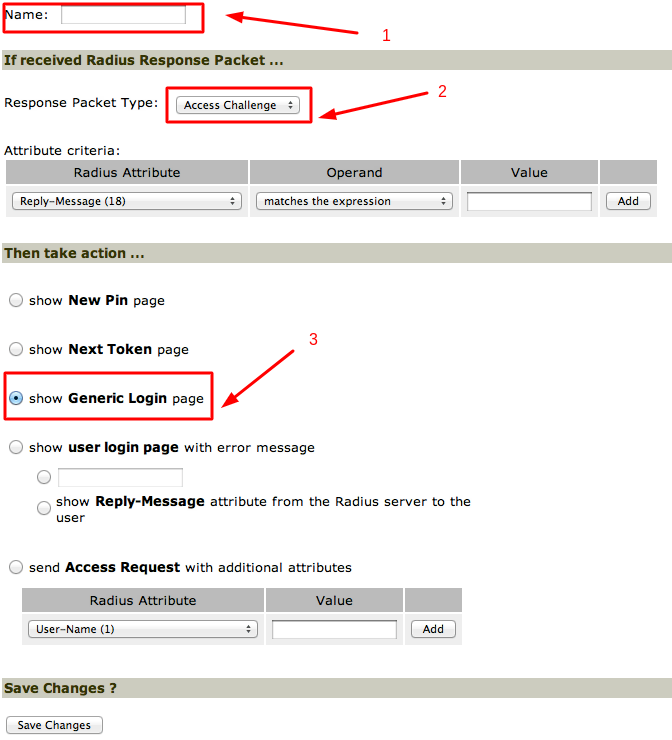
- Haga clic en Save Changes.
2.4.2. Crear otra regla para el paquete Access Reject
- Haga clic en New Radius Rule.
- En el campo Name, introduzca Protectimus Radius Rule 2.
- Para el Response Packet Type, seleccione Access Reject.
- En la sección Then take action section, seleccione la página Show Generic Login.
- Haga clic en Save Changes.
2.5. Configurar un dominio de usuarios
Para configurar un dominio de usuarios para Protectimus Radius Server, puede realizar una o varias de las acciones siguientes:
- Crear un dominio nuevo para realizar pruebas;
- Crear un dominio para migrar gradualmente a los usuarios al nuevo sistema, por ejemplo, duplicando uno existente;
- Utilizar el dominio Users predeterminado.
Para añadir la 2FA a un dominio de usuarios:
- En el menú de la izquierda, vaya a Users –> User Realms y haga clic en el enlace del dominio de usuarios al que desea añadir la autenticación secundaria.
- En el campo Authentication, seleccione Protectimus RADIUS y haga clic en Save Changes.
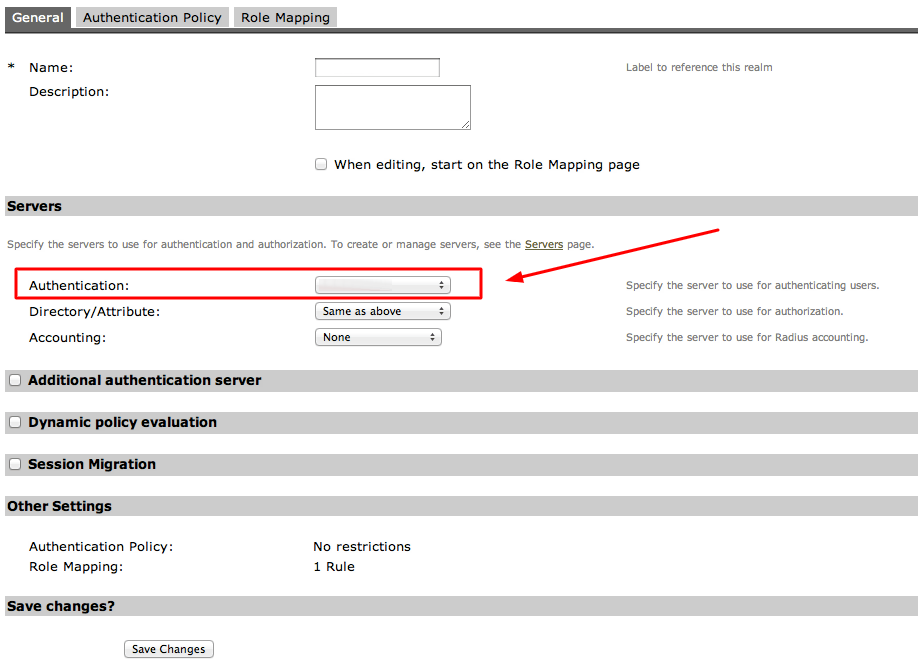
- Añada el dominio Protectimus RADIUS recién creado al dominio de autenticación.
- Haga clic en Authentication –> Signing In –> the relevant User URL.
- Mueva el dominio recién creado del área Available realms al área Selected realms.
- Haga clic en Save Changes.
La integración de la autenticación de dos factores (2FA/MFA) para Juniper Secure Access SSL VPN ha finalizado.
Si tiene alguna otra pregunta, póngase en contacto con el servicio de atención al cliente de Protectimus.













