



Esta guía detalla los pasos para configurar la autenticación multifactor (MFA o 2FA) de Protectimus para Nerdio mediante el protocolo RADIUS.
Al integrar la autenticación de dos factores de Protectimus con Nerdio mediante RADIUS, Protectimus Cloud 2FA Service u On-Premise 2FA Platform actúa como servidor RADIUS a través de un conector específico denominado Protectimus RADIUS Server. Por su parte, Nerdio funciona como cliente RADIUS.
El funcionamiento es el siguiente: el conector Protectimus RADIUS Server reenvía las solicitudes de autenticación de Nerdio al servidor de autenticación multifactor (MFA) de Protectimus. En función de la respuesta recibida, se concede o deniega el acceso.
A continuación, ofrecemos un ejemplo de cómo integrar Protectimus 2FA con Nerdio.
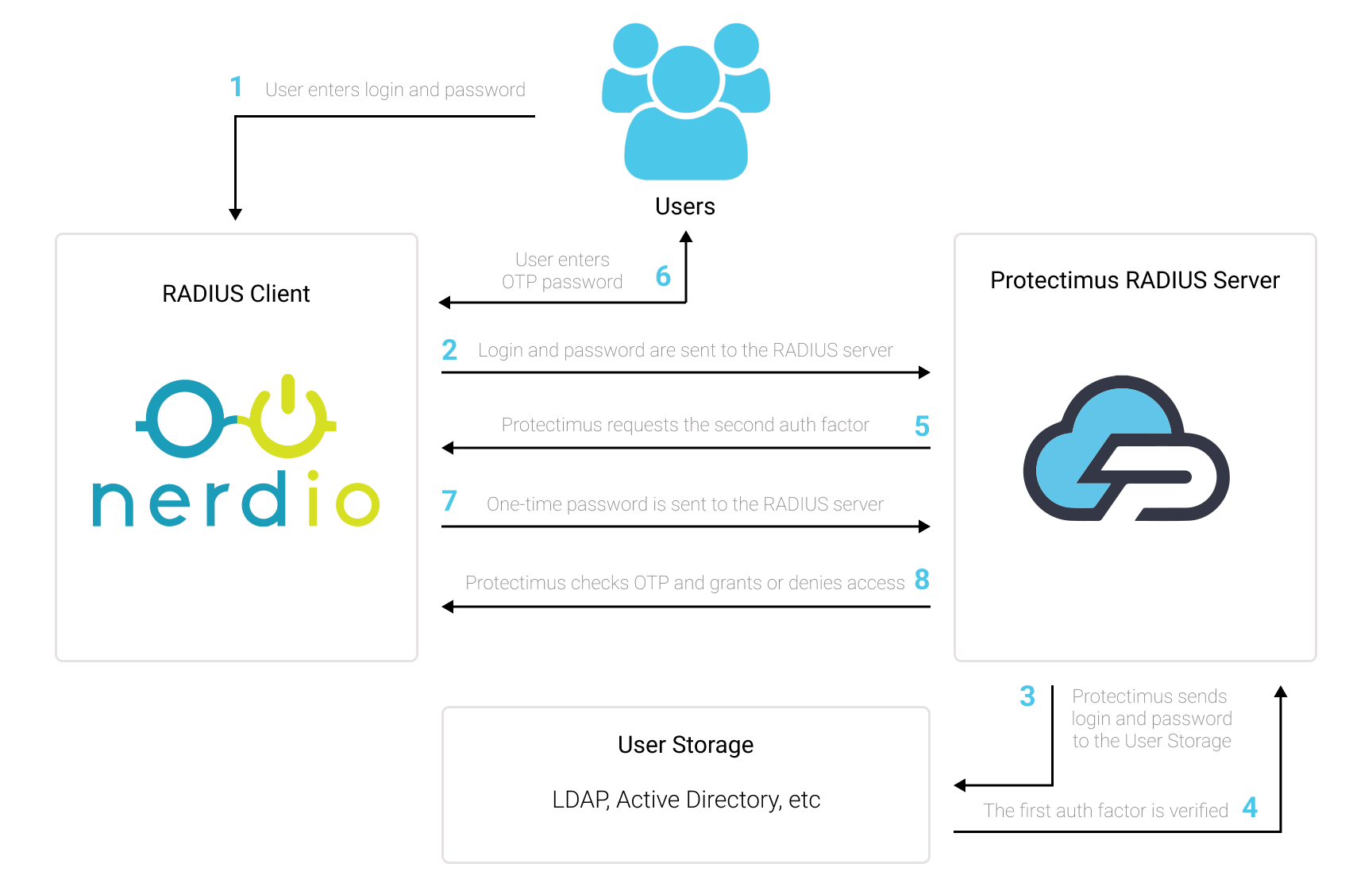
Puede configurar la autenticación multifactor (2FA) para Nerdio con Protectimus mediante el protocolo RADIUS:
- Regístrese en Protectimus SAAS Service o instale On-Premise 2FA Platform y configure los ajustes básicos.
- Instale y configure Protectimus RADIUS Server.
- Añada Protectimus como servidor RADIUS para Nerdio.
Elija la opción de despliegue y complete la configuración básica:
Encontrará instrucciones detalladas para instalar y configurar Protectimus RADIUS Server para la autenticación de dos factores de Nerdio mediante RADIUS en nuestra guía de instalación de Protectimus RADIUS Server para la 2FA de Nerdio.
| Label | Introduzca un nombre para el servidor RADIUS. |
| Hostname/Address | Dirección IP del servidor en el que está instalado el componente Protectimus RADIUS Server. |
| Authentication Port | Indique 1812 (o el puerto que haya configurado en el archivo radius.yml de Protectimus al configurar Protectimus RADIUS Server). |
| Authentication Type | Se requiere la autenticación PAP. |
| Shared Secret Code | Indique el secreto compartido que creó en el archivo radius.yml de Protectimus (propiedad radius.secret) al configurar Protectimus RADIUS Server. |
| Server Timeout (in seconds) | Establézcalo en 90 segundos. |
| Max Attempts | Este valor especifica cuántas veces debe enviarse la solicitud de autenticación. Establézcalo en 1. |
La integración de la autenticación de dos factores (2FA/MFA) para Nerdio ha finalizado.
Si tiene alguna otra pregunta, póngase en contacto con el servicio de atención al cliente de Protectimus.










