












MFA Platform for
Managed Service Providers
Deliver managed MFA services to multiple customers from one centralized platform. Manage each customer separately and deploy Protectimus in the cloud or on-premise.
Manage Multiple Customers from One Platform
Protectimus gives MSPs a single platform to manage MFA across multiple customers while keeping each customer’s users, tokens, policies, and settings separate within its own Resource.
As your business grows, you can add new customers and manage them from the same platform without making MFA administration unnecessarily complex.
Separate Customer Resources
Organize each customer in a separate Resource with its own users, tokens, authentication policies, and settings. This keeps customer environments clearly separated and makes day-to-day administration easier.
Delegated Administration
Give customer administrators access to manage their own Resource while the MSP retains centralized control over the platform. This reduces the amount of routine work that needs to be handled by the MSP team.
Less Administrative Work
Reduce routine administration with automatic user synchronization from Active Directory via LDAP, token auto-enrollment, configurable user self-service, and Self-Service Password Reset (SSPR).
Users and their information can be synchronized automatically from Active Directory, while end users can handle permitted enrollment, MFA, and password recovery tasks themselves — reducing manual work for MSP and customer administrators.
Multi-Tenant MFA Architecture for MSPs
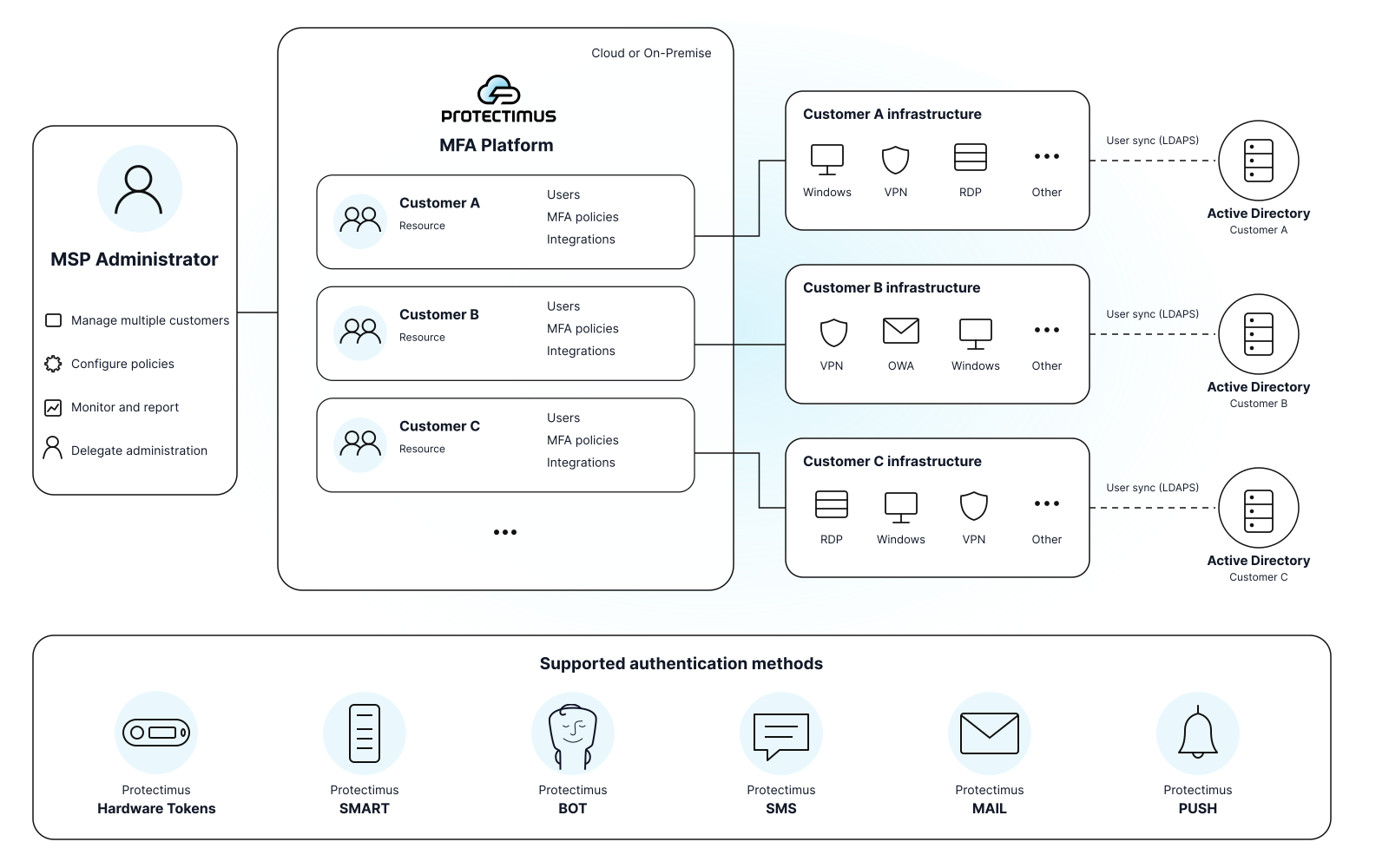
How Protectimus Works for MSPs
Set up and manage MFA for each customer in six straightforward steps

Create a Customer Resource
Set up a Resource for the customer and define their MFA policies, security settings, and administrator permissions.

Connect Protected Systems
Install and configure the required Protectimus connectors and plugins for Windows and RDP, VPN and RADIUS services, OWA, Active Directory, and other systems that require MFA.

Synchronize Users from Active Directory
Connect Active Directory via LDAP to automatically import and synchronize user information. Use synchronization rules to select which AD users or groups should be protected with MFA instead of maintaining the user base manually.

Configure MFA Enrollment
Define which authentication methods are available to different users through authentication policies. With token auto-enrollment enabled, users can register an allowed second factor themselves without administrator involvement.

Configure User Self-Service
Define which MFA management actions users can perform themselves. Depending on the configured rules, users can manage operations such as replacing a token or changing their authentication method without contacting support.

Enable Self-Service Password Reset
Configure SSPR so users can securely reset or recover their Active Directory password without involving the MSP or customer help desk.
Flexible Deployment Options for Any Client
Choosing the right deployment model is essential for MSPs delivering MFA as a service — and Protectimus offers full flexibility with both cloud and on-premise options
Cloud MFA
for MSPs
Start offering multi-factor authentication instantly, without deploying or maintaining any infrastructure. The Protectimus cloud platform lets MSPs onboard clients in minutes, scale effortlessly, and achieve high margins with minimal operational overhead.

On-Premise MFA Platform
Deploy the full MFA environment within your infrastructure for maximum control. Designed for MSPs who must ensure data sovereignty, meet demanding compliance standards, apply their own branding, and integrate deeply with client systems.

Integration:
API and Plugins
Protectimus supports all major authentication standards and systems, making it one of the most flexible MFA solutions for MSPs. With ready-to-use API and pre-built integration components, you can connect Protectimus to your existing infrastructure in minutes. Our team is always ready to assist, ensuring a smooth, guided integration experience from start to finish.
Protectimus DSPA (Dynamic Strong Password Authentication) integrates directly with AD, LDAP, or any user directory, enabling you to secure access to all nodes in your infrastructure at once.
Set up two-factor authentication for Outlook Web App (OWA) and Exchange Admin Center (EAC) using a ready-to-use OWA plugin, compatible with Exchange 2013, 2016, and 2019.
The Protectimus MFA Platform seamlessly integrates with Active Directory Federation Services (ADFS 3.0 & 4.0), enhancing security with minimal effort.
Use Protectimus ADFS or Office 365 components and the On-Prem MFA Platform to enable single sign-on (SSO) with extra security from time-based one-time passwords.
Add two-factor authentication to Windows 8, 8.1, 10, 11, and Windows Server 2012, 2016, 2019, 2022. Protects both local accounts and remote desktops (RDP).
Secure your VPN, Wi-Fi, firewalls, and any RADIUS-based system with two-factor authentication. Protectimus integrates seamlessly with Cisco, Citrix, VMware, FortiGate, SonicWALL, OpenVPN, etc.
Integrate the Protectimus On-Premise Platform with Ubuntu or macOS via RADIUS to secure your corporate accounts with multi-factor authentication.
You can use our API for direct integration with your systems and applications. Protectimus API is designed according to REST principles. Data is transmitted as XML or JSON.
White-Labeling & Customization
Make Protectimus part of your own product offering. We offer branding for tokens, apps, and the platform, plus customization to fit your processes and integration needs. We prioritize your requirements and are happy to help with any specific requests.
Customizable MFA Platform
If you need specific functionalities or design, our team is ready to tailor the Protectimus MFA platform to your exact requirements.
Protectimus SMART App
We can rebrand the Protectimus SMART OTP app with your company’s name, logo, and design style to match your corporate identity.
Hardware OTP Tokens
For orders of 1,000 or more, we can produce hardware tokens in your corporate style, ensuring consistency across all your authentication tools.
Wide Selection of Authentication Methods
Here's what our customers say
-
SICIM
-
DXC
-
Volet
At the moment, my assessment of the company’s work is 10 out of 10. An important factor in choosing this two-factor authentication provider was the possibility of customizing the 2FA system for our project. After we got in touch with the Protectimus team and explained the task, they implemented the necessary functionality for us free of charge. There were no problems. Everything works well.
Cristian G, System Administrator at SICIM
Protectimus was chosen because of their unique Dynamic Strong Password Authentication (DSPA) technology. Using this product, we added 2FA to all the systems we needed to protect in one fell swoop, as it allowed us to integrate two-factor authentication services straight with Active Directory. We have been using the Protectimus two-factor authentication platform for a year and are satisfied with this product.
Mauro S., Xchanging Italy a DXC Technology
Over the past years, we’ve had only positive cases of working together. Protectimus helped us at every stage, from integration to adding additional features that solved our specific tasks. Using Protectimus, we are confident that Volet infrastructure and users are well protected. Protectimus gives us what money can’t buy – not a sense of security, but REAL security. I highly recommend it for implementation.
Artem Sh., Info Security Director at Volet
Set Your Own Price and
Build Recurring Revenue
Protectimus provides MSP partners with special pricing for MFA services and hardware tokens. You decide how to package the service and set the final price for your customers.
Build your own managed MFA offering and generate recurring revenue as your customer base grows.
Special MSP Pricing
Get special partner pricing for Protectimus MFA services and hardware tokens, giving you flexibility to build competitive offers for your customers.
Your Service, Your Price
Create your own MFA service packages and set the final price for your customers. Combine MFA with your implementation, administration, support, and other managed services.
Integration & Technical Support
Our team will help you get started, assist with integrations and deployment, and provide the technical guidance you need. We can also train your team to work with Protectimus and support customer implementations.
Our Partners










Become Our MSP Partner
FAQ
How does Protectimus help MSPs manage multiple customers?
Protectimus provides centralized management of multiple customers from a single MFA platform. Each customer can be organized in a separate Resource with its own users, tokens, authentication policies, settings, and protected systems.
MSP administrators maintain centralized control while keeping customer configurations separated.
Can customers manage their own MFA users and settings?
Yes. MSPs can delegate administration of a specific Resource to a customer administrator without giving them access to other customer Resources.
This allows customers to handle routine administration themselves while the MSP retains overall control of the platform.
Do I need a separate Protectimus Server for each customer?
No. A single Protectimus platform can contain multiple customer Resources, so MSPs do not need to deploy and maintain a separate MFA server for every customer.
New Resources can be added as the MSP customer base grows.
Can each customer have different MFA policies and authentication methods?
Yes. Each customer Resource can be configured according to its own security requirements, including authentication policies and supported MFA methods.
This allows an MSP to serve customers with different infrastructures and security requirements from the same platform.
How can MSPs simplify MFA onboarding for new users?
Protectimus supports token auto-enrollment, allowing users to register supported authentication tokens themselves instead of requiring an administrator to manually enroll every token.
This makes large user deployments easier and reduces the amount of routine work required during customer onboarding.
What can users do through Protectimus self-service?
Administrators can define which self-service actions are available and the rules under which users can perform them. Users can then complete permitted MFA-related actions themselves instead of submitting a support request.
Protectimus also supports Self-Service Password Reset (SSPR), allowing users to securely reset or recover passwords without routine administrator involvement.
How does Protectimus help MSPs reduce support and administration costs?
Protectimus combines centralized customer management with delegated administration, token auto-enrollment, user self-service, and SSPR.
Routine operations can be handled by customer administrators or end users instead of the MSP support team. This helps MSPs serve a growing number of customers without increasing administrative workload at the same rate.
Ready to get started?
Ready to strengthen your security with Protectimus multi-factor authentication? Our comprehensive guides will walk you through the seamless integration process. Our dedicated support team is ready to assist you. Get started today and enhance your authentication with Protectimus.
