
Protectimus Dynamic Strong Password Authentication (DSPA) now supports passwordless authentication based entirely on one-time passwords (OTPs). Users authenticate using temporary dynamic credentials generated with the TOTP algorithm, eliminating the risks associated with static passwords while maintaining a secure and user-friendly login experience.
In this article, we explain how OTP-only authentication works in Protectimus DSPA, how it integrates with Active Directory and other directory-based environments, and where passwordless authentication can be effectively applied.
How Protectimus DSPA Works
Protectimus Dynamic Strong Password Authentication (DSPA) integrates directly with user directories such as Microsoft Active Directory, LDAP, and other supported databases, replacing traditional static passwords with dynamic one-time passwords (OTPs) generated using the TOTP algorithm.
The administrator defines the OTP rotation interval, which must be a multiple of 30 seconds. As a result, users authenticate using temporary time-based OTP credentials instead of permanent static passwords.
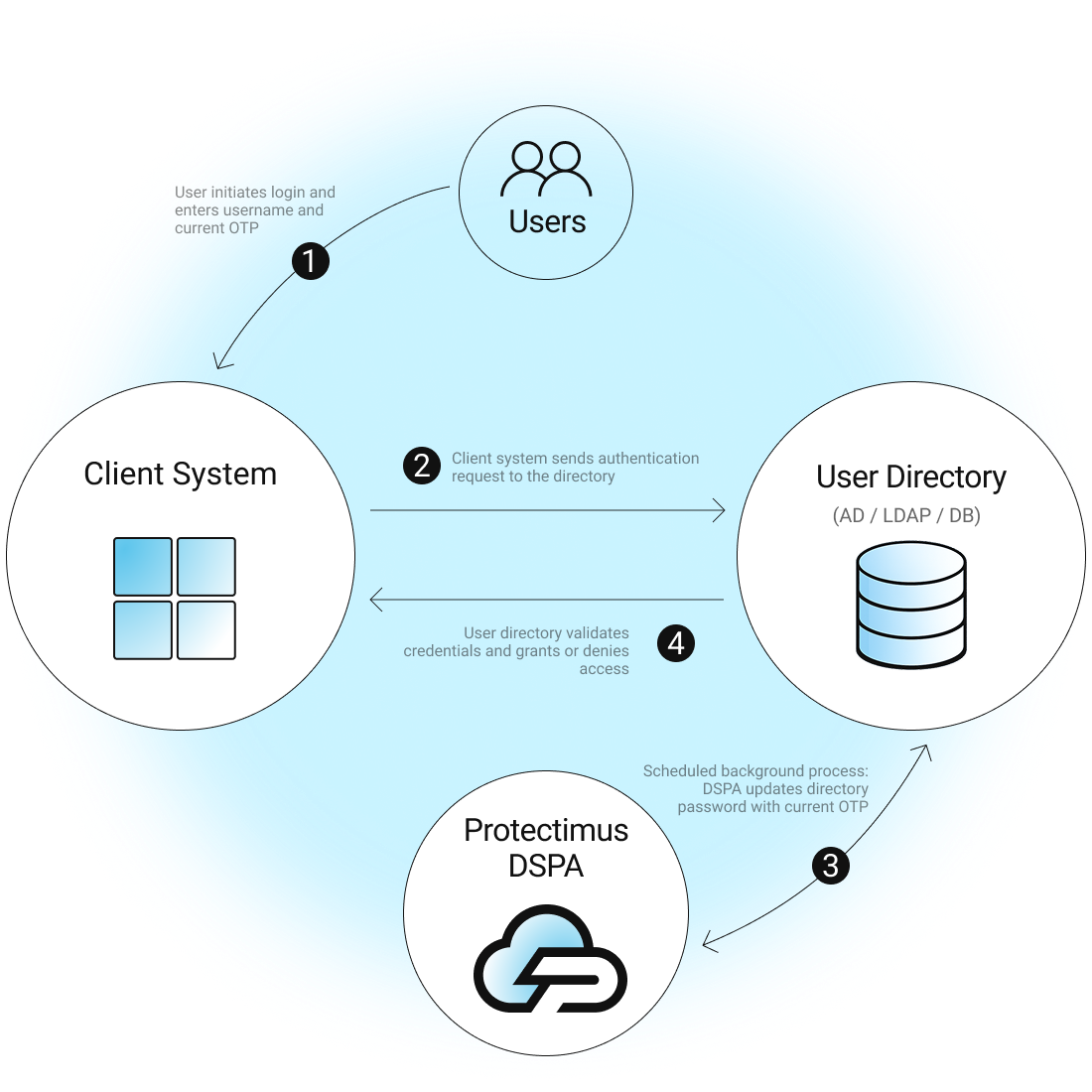
Administrators can define the OTP rotation interval, starting from 30 seconds with configurable step-based increases. Rotation policies can be configured individually for different users and groups.
In practice, users authenticate using temporary OTP credentials instead of permanent static passwords. OTPs can be generated in the Protectimus SMART authenticator app or delivered through Protectimus BOT chatbots in Telegram, Viber, or Facebook Messenger. Access to the app or chatbot can also be additionally protected with a PIN code or biometrics for enhanced security.
| Read also: Two-factor authentication for Windows 7, 8, 10
How Passwordless Authentication Works
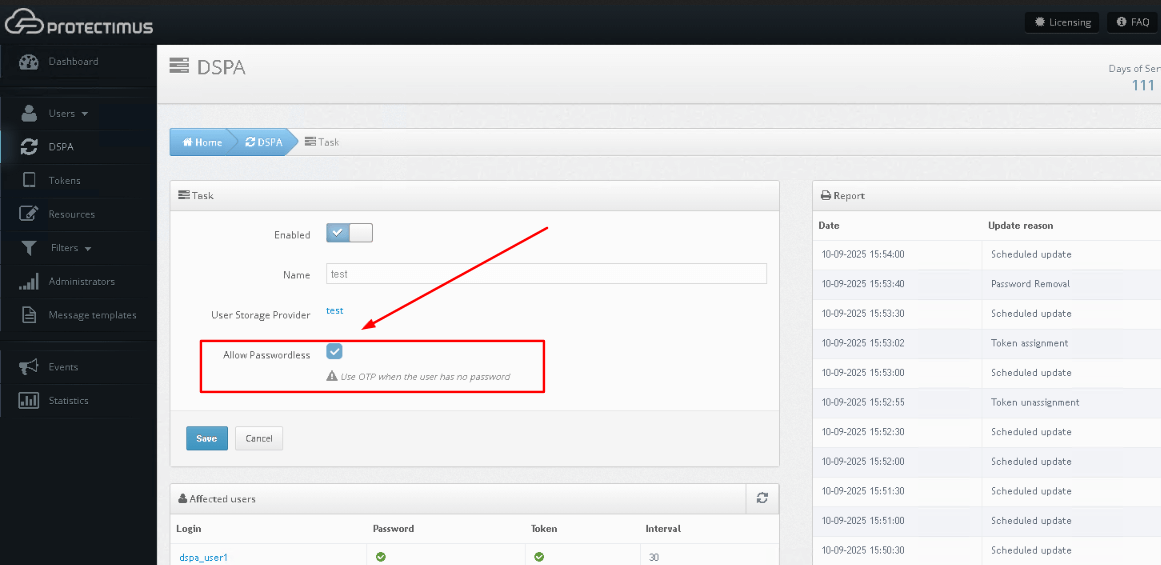
With the “Allow Passwordless” option turned on, users log in only with one-time passwords (OTPs). Static passwords are no longer part of the process. Instead of using a permanent password along with an OTP, authentication depends entirely on dynamic codes that change with each login attempt.
This method makes the user experience simpler while also greatly improving security. Weak, reused, or stolen passwords, which are a common cause of breaches, are completely eliminated. At the same time, OTPs make sure that every login is confirmed with a unique, time-limited credential.
Administrators can choose how widely to apply this setting. Passwordless authentication can be enabled for all accounts to create a consistent login process across the organization, or it can be activated only for specific users and systems where minimizing password risks is particularly important.
Advantages of Passwordless Authentication Mode
Passwordless authentication with Protectimus DSPA brings a range of benefits for both users and administrators:
- Simplified User Experience. Users don’t need to remember complex passwords or update them regularly. Logging in with a single OTP makes access faster and easier while still keeping accounts secure.
- Reduced IT Overhead. Fewer password-related support requests and resets mean IT teams can spend less time managing credentials and focus on other priorities, all while maintaining strong security.
- Lower Password Risks. Removing static passwords eliminates the threat of weak, reused, or stolen credentials. Every login relies on a time-based one-time password (OTP) that constantly changes and can’t be reused.
- Flexible Deployment. Administrators can enable passwordless authentication for everyone or only for specific users and groups, making it easy to tailor security policies to the organization’s needs.
In short, passwordless authentication simplifies the login process for users without compromising security, providing organizations with a flexible way to protect their systems without relying on static passwords.
| Read also: Authenticator App Protectimus SMART Updated – Now With Encrypted Cloud Backup
When to Use Passwordless Authentication vs. Password + OTP
Choosing between passwordless authentication and the traditional password + OTP approach depends on the level of security needed and the type of users or systems involved.
- Passwordless Authentication is ideal for internal applications, non-privileged users, or mobile-first workflows where convenience and speed are important, and the risk level is moderate.
- Password + OTP is perfect for critical systems, administrators, or accounts that handle sensitive data, where an extra layer of protection is required.
By assessing the sensitivity of each system and the user’s role, administrators can apply the appropriate authentication method, balancing security with usability.
| Read also: 2FA Security Flaws You Should Know About
What authentication methods are available
As mentioned above, with DSPA, administrators can set the time step for dynamic password updates — whether 30, 60, or even longer intervals. To work properly, the OTP token must support the selected interval.
Currently, the most commonly used method for two-factor authentication with DSPA is our free mobile app, Protectimus Smart OTP, available for both Android and iOS. It supports Active Directory as well as other sites and services, allowing OTP intervals in 30-second increments (30, 60, 90 seconds, etc.). This makes it an ideal choice for delivering OTPs in MFA setups.
Hardware TOTP tokens are also supported, generating OTPs every 30 or 60 seconds. Longer-interval and programmable tokens are in development, along with a future option for chatbot-based OTP delivery.

How to Enable Passwordless in Protectimus DSPA
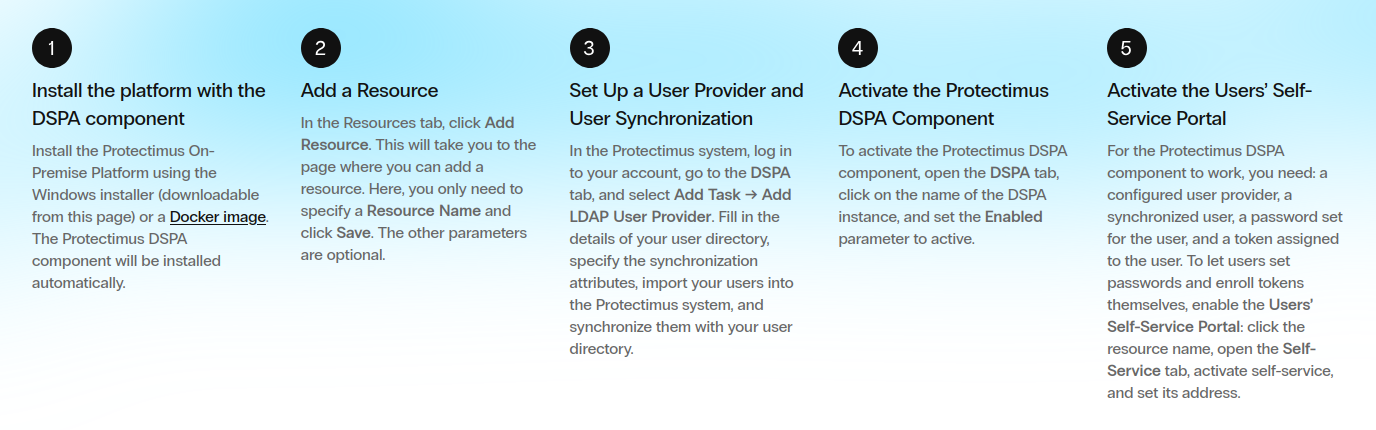
Enabling passwordless authentication in Protectimus DSPA is simple. After installing the platform with the DSPA component, add a resource and synchronize your users from your directory. Then, activate the DSPA component and enable the Users’ Self-Service Portal so users can manage their own passwords and tokens.
To switch to passwordless authentication, just select the “Allow Passwordless” checkbox. Once enabled:
- Users without a static password log in with OTP only.
- Users with a static password continue using password + OTP.
By default, DSPA combines a static password with a six-digit OTP (e.g., P@ssw0rd!459812). With passwordless mode, users only need to enter the OTP part, making login simpler while keeping strong security.
For detailed instructions and screenshots, check out our Protectimus DSPA setup guide.
Conclusion
Passwordless authentication in Protectimus DSPA offers organizations a modern, flexible way to secure user accounts without relying on static passwords. By allowing users to log in using only one-time passwords (OTPs), it simplifies the login process, reduces password-related risks, and lowers the burden on IT teams.
At the same time, administrators retain full control: passwordless mode can be applied selectively or organization-wide, and traditional password + OTP authentication remains available for high-risk accounts and critical systems. Combined with the Protectimus Smart OTP app or supported hardware tokens, DSPA ensures that every login is verified with a unique, time-limited credential.
Whether you’re looking to streamline access for internal apps, mobile workflows, or enhance security for sensitive systems, Protectimus DSPA’s passwordless feature provides a secure, user-friendly solution that adapts to your organization’s needs.
For a step-by-step guide to setting up passwordless authentication, see our Protectimus DSPA setup guide.
Read more
- Duo Security vs Protectimus
- Protectimus vs Rublon
- Protectimus vs. Okta
- Protectimus Customer Stories: 2FA for Volet
- Protectimus Customer Stories: 2FA for SICIM
- Protectimus Customer Stories: 2FA for Ipak Yo’li Bank
- Protectimus Customer Stories: 2FA for DXC Technology
- Protectimus MFA Prices: How to Save with Coupons, Discounts, Referrals, and Subscriptions
Subscribe To Our Newsletter
Join our mailing list to receive the latest news and updates from our team.

Subscribe To Our Newsletter
Join our mailing list to receive the latest news and updates from Protectimus blog.
You have successfully subscribed!