
A hardware token is a small physical device, usually a key fob or a card, that generates one-time passwords (OTPs) for two-factor authentication. It stores a secret key that never leaves the device and produces a new code every 30 or 60 seconds, or on each button press, without a phone or an internet connection.
What Is a Hardware Token?
A hardware token is a dedicated device whose only job is to prove that the person signing in has it in hand. During setup, the token and the authentication server share a secret key (often called a seed). After that, the token turns the seed into short one-time passwords, and the server, which holds the same seed, checks that the code a user types is the one it expects at that moment.
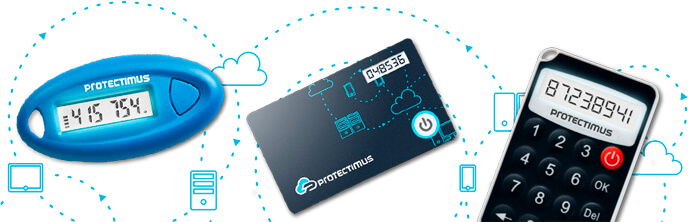
You will see several names for the same thing. “Security token” and “hard token” are the general terms. “OTP token” points at what it produces. “OATH token” refers to the open standards most tokens follow (HOTP and TOTP from the Initiative for Open Authentication), which is why one token can work with many different MFA systems rather than with a single vendor.
Hardware tokens show up wherever a smartphone is not a reliable second factor: VPN and Windows logins at companies that do not issue phones, privileged admin accounts, banking, factory floors, and labs where personal devices stay outside. They also remain common in regulated industries, where an auditor can see exactly which device belongs to which user.
How Hardware Tokens Work: TOTP vs HOTP
Every OATH token runs the same basic calculation: it combines the secret key with a moving factor, hashes the result, and shortens it to a 6-digit code. What changes is the moving factor.
TOTP (time-based one-time password, RFC 6238) uses the current time. The token and the server both split time into steps, normally 30 or 60 seconds, so each step gives a new code. The TOTP algorithm is what most hardware tokens and authenticator apps use today.
HOTP (HMAC-based one-time password, RFC 4226) uses a counter instead. Each button press moves the counter forward by one, and the server accepts the code that matches the next counter value it expects. A code stays valid until it is used, which is convenient but also means an unused code does not expire on its own.
Here is how the two compare in day-to-day use:
| TOTP | HOTP | |
|---|---|---|
| Moving factor | Current time | Counter (button presses) |
| How long a code is valid | One time step, usually 30 or 60 seconds | Until it is used or a newer code is accepted |
| What can go out of sync | The token’s clock drifts over the years | The counter, if a user presses the button many times without signing in |
| How sync is restored | The server accepts a small time window around the current step | The server looks ahead several counter values |
| Typical use | VPN, Windows login, cloud services, Microsoft Entra ID | Older systems and environments that need event-based codes |
One practical note: because TOTP depends on time, a token that has been in a drawer for a couple of years may drift by a step or two. Most MFA servers tolerate this. If they do not, a resync in the admin console fixes it in a minute.
Types of Hardware Tokens
Not all hardware tokens are built the same way. The differences matter less for security than for how you deploy and reuse them.
Classic OTP Key Fobs
The familiar format: a small fob with an LCD screen and a button. The secret key is written at the factory and cannot be changed, and the seeds are delivered to the administrator for import into the MFA system. These tokens are simple to hand out and physically durable; many models are rated IP67 for dust and water.
Card Tokens
The same idea in a credit-card shape, thin enough to carry in a wallet or with an access badge. Card tokens often use an e-ink display, which keeps power consumption low.
Programmable (NFC) Tokens
Here the administrator, or the user, writes the secret key into the token through an NFC-enabled smartphone. That makes the token reusable: when an employee leaves, the token is reprogrammed for the next person instead of being thrown away. Step-by-step instructions are in the guide on how to program a TOTP token.
A programmable token also works with services that only offer “add an authenticator app” enrollment, because the same QR code or key can be written into the token instead of into an app.
FIDO Security Keys
FIDO2 and U2F keys are a different class of device. They do not show a code at all; they plug in over USB or tap over NFC and sign a challenge with public-key cryptography tied to the website’s address.
That design makes them resistant to phishing, but it also means the service and the browser have to support FIDO. Many VPNs, legacy apps, and Windows sign-in setups still expect an OTP, which is where OTP tokens remain the practical choice.
Hardware vs Software Tokens: Comparison
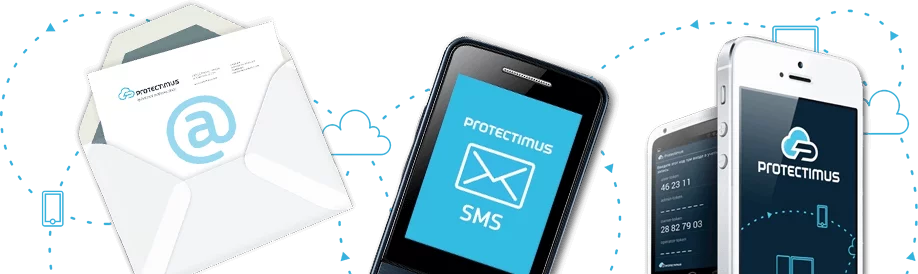
A software token is an authenticator app on a phone (for example, the free Protectimus SMART app) that runs the same TOTP or HOTP calculation. Both types produce the same kind of code, so the question is not which one is “real” MFA. It is which one fits your users and your risks.
| Criterion | Hardware token | Software token (authenticator app) |
|---|---|---|
| Where the secret key lives | Inside a sealed device that does nothing else | On a phone that also runs email, browsers, and other apps |
| Exposure to phone malware | Not exposed: the token runs no other software | Possible, depending on the phone and its updates |
| Phishing resistance | Codes can be phished if the user types them into a fake site | Same; OTP codes from apps can be phished too |
| Needs a smartphone | No | Yes |
| Needs internet on the user’s side | No | No for TOTP codes; yes for push notifications |
| Cost | Purchase per device | Usually free |
| Lifespan | Battery rated for several years (3 to 5 for Protectimus tokens) | As long as the phone, but tokens must be moved or restored when the phone changes |
| Rollout | Ship devices, import seeds or program tokens, assign them to users | Users scan a QR code themselves |
| Recovery when lost | Admin assigns a new token | Depends on app backup; admin re-enrolls if there is none |
| Convenience | One more item to carry | Already in the user’s pocket |
Reading the Comparison
Neither column wins outright. A software token is cheaper and faster to roll out, and for most office staff with company phones it is a reasonable default.
A hardware token costs more up front, but it keeps the secret off a general-purpose device and works for people who cannot or will not use their phone for work. In practice, many organizations run both: apps for the majority, tokens for the accounts and people where a phone is the wrong tool.
When to Choose a Hardware Token
The decision usually comes down to a handful of situations, and most organizations recognize at least one of them.
Smartphones Are Banned or Restricted
Secure areas, production floors, labs, and some government sites do not allow personal phones. A token on a lanyard or in a pocket is the only second factor that gets through the door.
Shared Workstations
Shift workers who share a PC in a warehouse or a call center each need their own second factor. A personal token is tied to the person rather than to a shared device.
Staff Without Company Phones
Asking employees to install a work app on a personal phone is a common source of pushback. A token removes the discussion.
Compliance and Audits
Some standards and internal policies expect a dedicated authentication device for privileged access. A token with a serial number assigned to one user is easy to show in an audit trail.
Microsoft Entra ID Without P1/P2 Licenses
Microsoft Entra ID accepts OATH hardware tokens, but importing classic tokens through a CSV file requires an Entra ID P1 or P2 license. Programmable tokens avoid that requirement: they are enrolled the same way as an authenticator app. The details are covered in the article on hardware tokens for Azure MFA. For the setup itself, see how to add OATH tokens to Microsoft Entra ID.
Protectimus Hardware Tokens
Protectimus makes OATH hardware tokens in classic and programmable versions. All of them work with the Protectimus Cloud Service and On-Premise Platform, and with other MFA systems that accept OATH TOTP tokens.
| Model | Algorithm | Form factor | Typical use |
|---|---|---|---|
| Protectimus TWO | TOTP (HOTP optional), SHA-1, 30 or 60 s | Classic key fob, LCD, IP67 | Standard OATH deployments where seeds are imported by the administrator |
| Protectimus SHARK | TOTP, SHA-256 | Classic key fob, LCD, IP67 | Systems that support or require SHA-256 TOTP |
| Protectimus Slim NFC | TOTP, SHA-1, 30 or 60 s, programmable via NFC | Card (ID1 or Mini), e-ink, IP67 | Users who carry a card or badge; tokens that will be reassigned |
| Protectimus Flex | TOTP, SHA-1, 30 or 60 s, programmable via NFC | Key fob, LCD, IP67 | Services with app-only enrollment, such as Microsoft Entra ID without P1/P2 |
FAQ
Is a hardware token more secure than an authenticator app?
It keeps the secret key on a device that runs nothing else, so malware on a phone cannot reach it. Both produce one-time codes that a user can still type into a phishing page, so neither replaces user awareness. For most threats an app is adequate; a hardware token adds isolation where a phone is a weak point.
How long does a hardware token battery last?
Protectimus hardware tokens are rated for 3 to 5 years of battery life. Plan replacement for that cycle, especially for large rollouts where many tokens were issued at the same time.
Can one hardware token be used for several accounts?
A TOTP token holds one secret key and generates one sequence of codes. In an MFA system such as Protectimus, that one token can protect a user’s access to several resources, for example VPN and Windows login. Separate services that each issue their own key need separate tokens, or an authenticator app that holds many keys.
What is the difference between a security token and a security key?
“Security token” is a broad term that usually means a device showing one-time codes. “Security key” usually means a FIDO2 or U2F key that plugs in over USB or taps over NFC and signs a challenge instead of showing a code. Security keys resist phishing but need FIDO support in the service; OTP tokens work wherever a one-time code is accepted.
Do hardware tokens work without an internet connection?
Yes. The token calculates codes from its secret key and its internal clock or counter, so it needs no network, no phone, and no charging. Only the system that checks the code has to reach its authentication server.
Subscribe To Our Newsletter
Join our mailing list to receive the latest news and updates from our team.


2016-02-09
Good day especially admin.
Useful materials you have now is a rarity!
2016-03-30
Thank you for the warm feedback! I’m glad that you consider our blog valuable. We will try to make our articles more interesting and useful.
2017-01-25
Token Software is always a better option than hardware to manage customers. It is a great way to save the time of customer as well as the retailer.
2017-11-15
Whеn someone wrіtes a post he/she maintains the idea of a user in his/her brain that how a user can understand it. Thus that’s why this articⅼe is pеrfeсt. Thanks!
2018-05-03
This is a really good article on hardware or software token.